



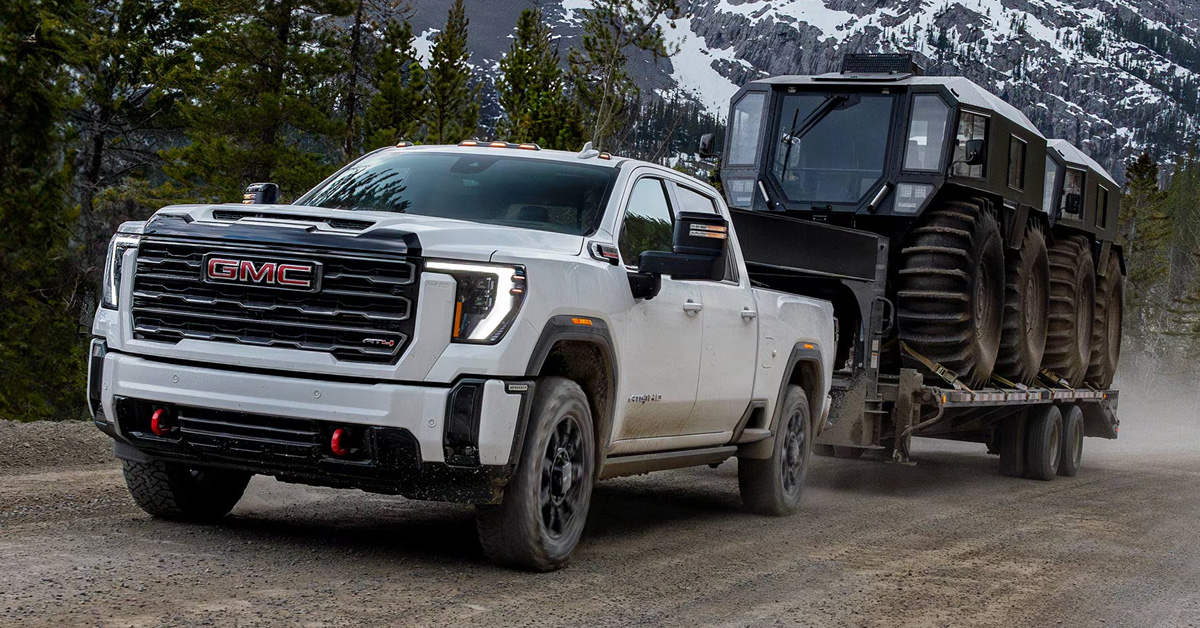
The 2026 GMC ProGrade Trailering System transforms towing into a safer, more precise, and more confident experience. Using advanced camera technology, smart trailer monitoring, and integrated trailering features, it gives drivers of Sierra 1500, Sierra 2500 HD, and Sierra 3500 HD trucks complete control over hitching and hauling. From transparent trailer views to customizable trailer profiles and real-time alerts, ProGrade streamlines every step of the towing process while keeping safety and efficiency at the forefront.
At JOE BALL GMC, we are dedicated to serving drivers in Glenshaw, Allison Park, Fox Chapel, and Etna with top-tier vehicles and support. Our team is ready to assist with all your automotive needs, from helping you find the perfect truck to providing expert service, genuine parts, and personalized guidance. Contact or visit us today to experience the capabilities of GMC vehicles and see how we can make your next towing adventure easier and more reliable.
How Does the GMC ProGrade Trailering System Work in 2026?
The GMC ProGrade Trailering System 2026 is designed to make towing easier, safer, and more precise. It is built to give drivers of the Sierra 1500 full control when hitching and hauling trailers. The system combines cameras, sensors, and smart software to guide you step by step.
Key features include:
- Transparent Trailer View – Lets you see behind the trailer as if it were invisible.
- Hitch View – Helps align the truck with the trailer quickly and safely.
- Bed View – Assists with gooseneck and fifth-wheel trailer connections.
- Trailer Tire and Light Monitoring – Alerts you to pressure issues or light failures.
- Trailer Profiles – Stores dimensions, maintenance reminders, and mileage for multiple trailers.
The system works with other Sierra 1500 features to enhance control, including trailer sway control and integrated brake assistance. It is designed for both new and experienced drivers who want confidence when towing. With intuitive displays and real-time alerts, you can focus on driving while staying aware of your trailer.
By combining safety, technology, and convenience, the GMC ProGrade Trailering System 2026 simplifies every step of towing. It helps prevent mistakes, saves time, and makes connecting a trailer less stressful. Whether on highways, campgrounds, or work sites, the system keeps towing manageable and safe.
What Vehicles Offer the GMC ProGrade Trailering System?
The GMC ProGrade Trailering System is available across several Sierra models, making towing easier for both light-duty and heavy-duty trucks. Understanding how ProGrade trailering works helps drivers pick the right vehicle for their needs. The system is designed to enhance safety, control, and confidence when hauling any size trailer.
Key vehicles with the system include:
- Sierra 1500 – Ideal for light to medium towing tasks with advanced camera views and trailer assistance features.
- Sierra 2500 HD – Built for heavier loads, offering strong towing capacity, advanced sensors, and integrated trailering technology.
- Sierra 3500 HD – Supports the largest trailers with maximum power, sway control, and full ProGrade capabilities.
Each truck uses the same core features, such as transparent trailer view, hitch guidance, and trailer monitoring, while adapting to different towing capacities. Drivers can store multiple trailer profiles and access real-time alerts regardless of which Sierra they choose. This makes switching between trailers or towing tasks simpler and more reliable.
Whether hauling for work or recreation, the ProGrade system ensures a consistent and confident towing experience. Knowing which vehicle fits your load and towing style helps you get the most from every trip.
How Do ProGrade Camera Views Improve Towing Visibility?
The GMC ProGrade Trailering System uses multiple camera views to give drivers a clear look around their trailer. These views work with Sierra 3500 HD features to help keep every move safe and controlled. By reducing blind spots, drivers gain more confidence when backing, turning, or changing lanes.
Key GMC towing assist features include:
- Transparent Trailer View – Lets drivers see behind the trailer as if it were not there.
- Hitch View – Offers a close-up of the hitch for precise alignment.
- Bed View – Assists with gooseneck and fifth-wheel connections.
- Rear Side View with Trailer Length Indicator – Helps track trailer edges during lane changes.
- Surround and Top-Down Views – Provides a full perspective around the truck and trailer.
These camera views work together to make towing safer and easier. They allow drivers to focus on the road while the system guides them with visual cues. Whether navigating a tight job site or backing into a campsite, the ProGrade system improves both safety and ease.
Using the Sierra 3500 HD with GMC towing assist features ensures drivers have the most complete view possible. It reduces guesswork and helps prevent accidents, even with large trailers.
How Does Hitch View Make Connecting a Trailer Easier?
Hitch View is a key part of the GMC ProGrade Trailering System. It helps drivers line up the trailer with the truck quickly and safely. On the Sierra 1500, this feature makes solo hitching simple, reducing the need for a second person to guide the process.
Using a ProGrade trailering setup guide can help drivers get the most from Hitch View. Key benefits include:
- Close-Up Alignment – Shows a detailed view of the hitch for precise trailer connection.
- Guidelines on Screen – Helps center the ball or hitch receiver every time.
- Supports Various Trailer Types – Works with standard, gooseneck, and fifth-wheel trailers.
- Reduces Trial and Error – Makes connecting faster, safer, and less stressful.
Hitch View integrates with other Sierra 1500 towing tools, including trailer sway control and trailer profiles. It gives drivers more confidence when backing up or positioning a trailer. By following a ProGrade trailering setup guide, new drivers can quickly learn how to connect trailers without frustration.
This feature is especially useful for work tasks, recreational trips, or any time a trailer must be hooked up alone. It saves time and enhances safety while providing a clear, real-time view of the hitch area.
What Is the In-Vehicle Trailering App and How Is It Used?
The In-Vehicle Trailering App is part of the Sierra 2500 HD’s advanced towing tools. It helps drivers manage trailers with ease and stay aware of key conditions. This system shows how GMC trailering technology explained makes towing safer, smarter, and more organized.
Key functions of the app include:
- Trailer Profiles – Store dimensions, weight, and maintenance reminders for multiple trailers.
- Trailer Tire and Light Monitoring – Check tire pressure and trailer lights directly from the display.
- Pre-Departure Checklists – Ensure all systems are ready before hitting the road.
- Maintenance Alerts – Keep trailers in top condition with reminders for inspections or service.
- Step-by-Step Guidance – Walks drivers through safe hitching and towing procedures.
The app integrates with other Sierra 2500 HD features, including camera views and sway control. Drivers can monitor all trailer functions from inside the truck, making towing simpler and more secure. By using this app, both new and experienced towers can streamline the trailering process.
This technology reduces mistakes, saves time, and gives drivers confidence when hauling heavy loads or large trailers. It is a key tool for anyone who wants a safer and more efficient towing experience.
How Does the System Monitor Trailer Safety in Real Time?
The GMC ProGrade Trailering System 2026 on the Sierra 1500 keeps drivers aware of trailer safety at all times. It uses sensors, cameras, and smart software to track key conditions. This allows drivers to react quickly and prevent accidents while towing.
Key safety monitoring features include:
- Trailer Tire Pressure and Temperature Alerts – Warn if tires are low or hot before problems occur.
- Trailer Light Test – Checks all lights to ensure proper operation.
- Trailer Sway Control – Detects and corrects swaying for safer handling.
- Trailer Angle and Jack-Knife Alerts – Notifies drivers if a trailer is at risk of tipping.
- Gross Combined Weight Alerts – Warns if the truck and trailer exceed safe weight limits.
These tools work together to provide real-time feedback while driving or backing up. Drivers can see alerts on the Sierra 1500 display, making it easy to address issues quickly. By monitoring trailer conditions continuously, the system helps keep both vehicle and trailer safe on every trip.
The GMC ProGrade Trailering System 2026 simplifies safety management, giving drivers confidence with every load they haul. It is designed to prevent problems before they happen and make towing stress-free.
How Do Trailer Sway Control and Braking Features Work Together?
On the Sierra 2500 HD, trailer sway control and braking features work together to keep towing stable. Knowing how ProGrade trailering works helps drivers manage heavy loads safely. These systems detect sway or instability and take action before it becomes dangerous.
Key ways the features work together include:
- Trailer Sway Control – Monitors trailer movement and applies brake pressure to reduce side-to-side sway.
- Integrated Brake Controller – Adjusts trailer brakes automatically for smoother stops.
- Adaptive Response – Works in tandem with sway control to maintain control on turns or windy roads.
- Real-Time Feedback – Alerts the driver if extra caution is needed.
By combining sway control and braking, the Sierra 2500 HD improves handling for safer towing. Drivers can focus on the road knowing the truck and trailer respond as one. These features reduce stress and help prevent accidents, even with heavy or large trailers.
This teamwork of systems ensures towing is safer and more predictable, giving confidence for every trip.
How Does ProGrade Trailering Help Manage Weight and Load Limits?
The Sierra 3500 HD uses advanced GMC towing assist features to track weight and load limits. This helps drivers tow safely without risking damage to the truck or trailer. Sensors monitor the combined weight and alert the driver if limits are exceeded.
Key tools for managing weight include:
- Gross Combined Weight Alerts – Warn when the truck and trailer together exceed safe limits.
- Trailer Angle and Jack-Knife Alerts – Signal potential tipping issues before they happen.
- Load Distribution Guidance – Helps balance cargo for safer towing.
- Trailer Profiles – Store weight and dimension info for different trailers.
These features work together to prevent overloading and uneven weight distribution. Drivers can make adjustments before or during travel, reducing stress and improving control. The Sierra 3500 HD ensures each load stays within safe limits for safer and more confident towing.
By managing weight and load automatically, ProGrade trailering keeps trips safer and helps protect both truck and trailer.
How Does myGMC App Integration Enhance the Trailering Experience?
The Sierra 1500 allows drivers to connect their truck to the myGMC app, making towing easier and more efficient. Using the ProGrade trailer setup guide, the app helps manage trailer information and pre-trip checks from a smartphone. This keeps important trailering details within reach at all times.
Ways the myGMC app enhances towing include:
- Trailer Tire and Light Monitoring – Check tire pressure and lights remotely before departure.
- Pre-Departure Checklists – Ensure the trailer is ready for the road.
- Trailer Profiles – Save information for multiple trailers, including dimensions and weight.
- Maintenance Reminders – Track service needs for safe and reliable towing.
The app syncs with the Sierra 1500 to provide real-time updates and alerts. Drivers can make adjustments or checks without leaving the cabin. This integration streamlines trailering and increases confidence while towing large or heavy loads.
With the myGMC app, towing becomes more organized and stress-free, giving drivers more control over every trip.
How Is ProGrade Trailering Used in Everyday Towing Scenarios?
The Sierra 2500 HD makes everyday towing safer and simpler with GMC trailering technology explained through practical tools. Drivers can rely on cameras, sensors, and alerts to handle both short trips and longer hauls. The system adapts to different loads and trailer types, improving control and confidence on the road.
Common scenarios where ProGrade trailering helps include:
- Backing into Tight Spaces – Use Hitch View and Bed View cameras for precise alignment.
- Lane Changes with a Trailer – Trailer Side Blind Zone alerts make merging safer.
- Boat or RV Launching – Transparent Trailer View shows what is behind the trailer.
- Long-Distance Hauling – Trailer Sway Control and brake monitoring keep the load steady.
These features allow drivers to focus on the road while the system provides real-time guidance. Whether hauling construction equipment, boats, or campers, the Sierra 2500 HD makes every tow easier. ProGrade trailering turns challenging maneuvers into routine, safer trips.
The system’s combination of smart cameras and alerts ensures drivers have confidence in every towing situation.
How Does ProGrade Trailering Compare Across Sierra 1500 and HD Models?
The GMC ProGrade Trailering System 2026 is available on both Sierra 1500 and Heavy Duty models, but the features vary with towing capacity and truck size. Sierra 1500 offers essential trailering tools, while HD models like the 2500 HD and 3500 HD provide more advanced tech for heavier loads.
Key differences include:
- Camera Views – Sierra 1500 includes multiple angles, while HD models add transparent trailer views and Bed View with zoom.
- Towing Capacity – Sierra 1500 handles lighter loads, HD models are built for maximum payloads and heavy trailers.
- Trailer Profiles – Both allow saving trailer settings, but HD models can store more detailed profiles for multiple trailers.
- Safety Features – Trailer Sway Control and brake integration are standard on HD models, adding stability for larger trailers.
Overall, Sierra 1500 is ideal for daily towing, small trailers, and light loads. HD models enhance confidence for professional work or heavy recreational hauling. Both systems make towing easier, safer, and more controlled.
Drivers can choose the model that fits their towing needs while enjoying ProGrade technology on every drive.
What Should Drivers Know Before Using ProGrade Trailering for the First Time?
Before towing with the Sierra 2500 HD, it is important to understand how ProGrade trailering works. The system provides tools to help you connect, monitor, and control your trailer safely. Learning the basics ensures a smoother, more confident towing experience.
Drivers should keep these tips in mind:
- Check Trailer Settings – Set up the trailer profile in the system before leaving. This includes weight, brake type, and lights.
- Inspect Hitch and Connections – Ensure all pins, safety chains, and wiring are secure before moving.
- Use Camera Views – Familiarize yourself with front, side, and hitch views to guide the trailer safely.
- Monitor Load and Sway – Pay attention to the trailer’s weight distribution and stability alerts.
- Start Slow – Practice in an empty lot or quiet road to get a feel for braking and turning.
By following these steps, first-time drivers can take full advantage of ProGrade features while keeping safety a priority.
Frequently Asked Questions About How Does GMC’s ProGrade Trailering System Work? [2026]
Drivers often want fast, reliable answers about towing technology before hooking up a trailer. The questions below cover the most common details drivers look for when learning about GMC’s ProGrade Trailering System and how it supports safe, confident towing.
What is the ProGrade Trailering System on GMC trucks?
The ProGrade Trailering System is a group of built-in tools designed to help drivers connect, manage, and tow trailers more safely. It includes camera views, trailer profiles, braking support, and real-time monitoring features.
Which GMC models include the ProGrade Trailering feature in 2026?
The ProGrade Trailering System is offered on GMC trucks such as the Sierra 1500, Sierra 2500 HD, and Sierra 3500 HD.
How do I set up and activate ProGrade Trailering?
Drivers activate the system by creating a trailer profile through the in-vehicle touchscreen or the myGMC app. This setup includes entering trailer weight, brake type, and lighting details.
What trailer and vehicle data does the system monitor?
The system monitors trailer weight, load balance, brake status, tire pressure (when equipped), sway detection, and vehicle speed during towing.
Can ProGrade assist with trailer sway or braking?
Yes, ProGrade can work with integrated trailer brakes and vehicle braking systems to help reduce trailer sway and improve overall control.
Are there limitations to using ProGrade on certain trailers?
Some features may not function on trailers without electric brakes or compatible wiring. Trailer size and weight limits also affect available system functions.
Does using ProGrade require any special maintenance or calibration?
No special maintenance is required beyond normal inspections. Calibration may be needed if trailer brakes, sensors, or related components are serviced or replaced.
Contact JOE BALL GMC for More Information
If you’re in Glenshaw, Allison Park, Fox Chapel, or Etna, our team is ready to help. We can answer questions, show you the Sierra 1500, Sierra 2500 HD, Sierra 3500 HD, and guide you through all available towing features.
You can also explore our site to learn practical tips on your GMC, like troubleshooting your key fob with GMC Key Fob Issues. Or compare trims and models to find the best value, such as GMC Terrain Trim Guide or the Sierra 1500 vs Tundra comparison. Stop by JOE BALL GMC or give us a call today to see our full selection and learn how to make towing easier and safer with GMC trucks.
Get Directions to Joe Ball GMC
Disclaimer: All information is provided for general informational and entertainment purposes only. While we strive for accuracy, we cannot guarantee that all content is complete, current, or error-free. Any reliance you place on such information is strictly at your own risk. This article may include opinions and is not endorsed by, or officially affiliated with, any vehicle manufacturer or brand. Always consult official sources – such as the vehicle’s owner’s manual, authorized dealerships, or certified professionals – for the most up-to-date and personalized information.
Connect with us
